
NEC Original Lens NP15ZL Zoom is a genuine optical accessory for NEC installation projectors, belonging to the long-throw category, with a throw ratio of 4.70-7.02:1. The original compatibility list covers 20 projector models; before installation, simply verify against the projector model and panel size — no adapter rings needed. The value of an original lens isn't a few extra rows of numbers on a spec sheet, but that it is calibrated at the factory to the optical path and mount of that series' chassis: once installed, the image circle, edge illumination, and focus travel are all at their design values, with no need to compensate image quality via keystone correction.
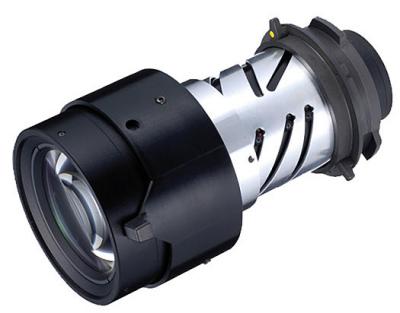
1. Lens Specifications
| Brand | NEC (NEC) |
| Lens Model | NP15ZL Zoom |
| Throw Ratio | 4.70-7.02:1 |
| Product Type | Long Throw |
| Compatible Models | 20 |
| Warranty | 12 months; after-sales service available for non-human damage, based on the date on the shipping document |
The above specifications are subject to the original manufacturer's specifications. For mechanical dimensions, flange focal distance, and mount type not shown in the spec table, please verify with us against the projector model — ordering based on model similarity alone carries the risk of incompatibility.
2. Converting Throw Ratio to Installation Distance
Throw ratio is the ratio of installation distance to image width. This original lens is a zoom lens (4.70-7.02:1), so the same image size corresponds to a range of distances; as long as installation falls within this range, focus can be achieved.
| Image Size | Image Width | Required Installation Distance |
|---|---|---|
| 100 inches | 2.15 m | Approx. 10.11 – 15.09 m |
| 120 inches | 2.58 m | Approx. 12.13 – 18.11 m |
| 150 inches | 3.22 m | Approx. 15.16 – 22.64 m |
| 200 inches | 4.30 m | Approx. 20.21 – 30.19 m |
The above figures are the clear distance from the lens face to the screen, excluding rear ventilation and cabling space behind the chassis. Calculated for 16:10 aspect ratio; actual values are subject to on-site measurement and the original manufacturer's manual.
Image quality differs at the two ends of the zoom range: toward the near end the image is brighter with slightly softer edges; toward the far end the edges are sharper with slightly reduced brightness. Where space permits, it is recommended to land in the middle of the range; after installation, first find the sharpest position on the focus ring, then fine-tune the shift.
3. Compatible Models (20)
The table below is taken from the original compatibility list; brightness and resolution are filled in from the model database, with "—" where unavailable, without speculation.
| Model | Brightness | Resolution |
|---|---|---|
| PA1004UL-B | 10000 lumens | 1920x1200 |
| PA1004UL-B-41 | 10000 lumens | 1920x1200 |
| PA1004UL-W | 10000 lumens | 1920x1200 |
| PA1004UL-W-41 | 10000 lumens | 1920x1200 |
| PA500U | 5000 lumens | 1920x1200 |
| PA500U-13ZL | 5000 lumens | 1920x1200 |
| PA500X | 5000 lumens | 1024x768 |
| PA500X-13ZL | 5000 lumens | 1024x768 |
| PA521U | 5200 lumens | 1920x1200 |
| PA521U-13ZL | 5200 lumens | 1920x1200 |
| PA550W | 5500 lumens | 1280x800 |
| PA550W-13ZL | 5500 lumens | 1280x800 |
| PA571W | 5700 lumens | 1280x800 |
| PA571W-13ZL | 5700 lumens | 1280x800 |
| PA600X | 6000 lumens | 1024x768 |
| PA600X-13ZL | 6000 lumens | 1024x768 |
| PA622U | 6200 lumens | 1920x1200 |
| PA622U-13ZL | 6200 lumens | 1920x1200 |
| PA672W | 6700 lumens | 1280x800 |
| PA672W-13ZL | 6700 lumens | 1280x800 |
To determine whether models outside this list are usable, please send us photos of the projector nameplate and the existing lens for verification — same-generation platforms often share mounts, but ordering based on model similarity alone is a risk not worth taking.
Throw Ratios Across Model Series
The same NP15ZL Zoom mounted on the following series has different nominal throw ratios; selection should be based on the actual series of the projector.
| Model Series | Throw Ratio |
|---|---|
| — | 4.70-7.02:1 |
4. Three Things to Confirm Before Replacement
- Confirm the projector chip and resolution. Original lenses are designed for specific panel sizes; with different panel specifications the image circle cannot cover the screen, resulting in vignetting or edge light loss after installation.
- Calculate the installation distance first. This lens has a nominal throw ratio of 4.70-7.02:1; use the table in Section 2 to map it to your venue dimensions. Prime lenses have no margin, and even zoom lenses should leave 10–20 cm at both ends.
- Verify the mount and locking. Original lenses are calibrated to the mount of that series' chassis; after installation you must hear the lock engage. Image skew and soft edges are mostly due to incomplete locking, not a problem with the lens itself.
If unsure, take a photo of the projector nameplate and the existing lens nameplate and send them to us — verification against the actual hardware is the most reliable approach.
Get Solution Consultation
For Zorsika NP15ZL Zoom original lens selection solutions, project configuration recommendations, or the complete compatibility list, please contact us via:
| Phone | 0086-20-38551187 |
| sales@zorsika.com | |
| Business hours: Monday to Friday 9:00-18:00 | |
The lens models, original part numbers, and compatible projector models in this article are sourced from the original compatibility list and the Zorsika product database. Data is continuously updated; please confirm with an actual quotation.