
On the second-hand market you often see two Barco lenses both rated 0.8:1 with prices differing by more than ten times. Many buyers assume it comes down to condition, channel, or whether the original packaging is included, but the real reason is generation. Take the super-wide zoom class: the EN46 from the FLD+ era and the EN66 from the FLDX era have identical native throw ratios, yet their optics and compatible projector models are a generation apart. What you save on the lens is usually paid back in image quality and compatibility.
1. Tell the three series apart - they map to three eras
Barco projector lenses fall into three generations by platform, and the naming mostly gives it away:
FLD: EN11, EN12, EN14, EN33, EN69 and similar - older high-definition lenses for 2K / WUXGA platforms.
FLD+: EN41 through EN47, the generation the EN46 in this article belongs to. It improved optics and mechanics over the HD platform but remains largely 2K; this generation has been superseded by FLDX.
FLDX: EN61 to EN68, plus EN76 and EN83 - redesigned for 4K panels.
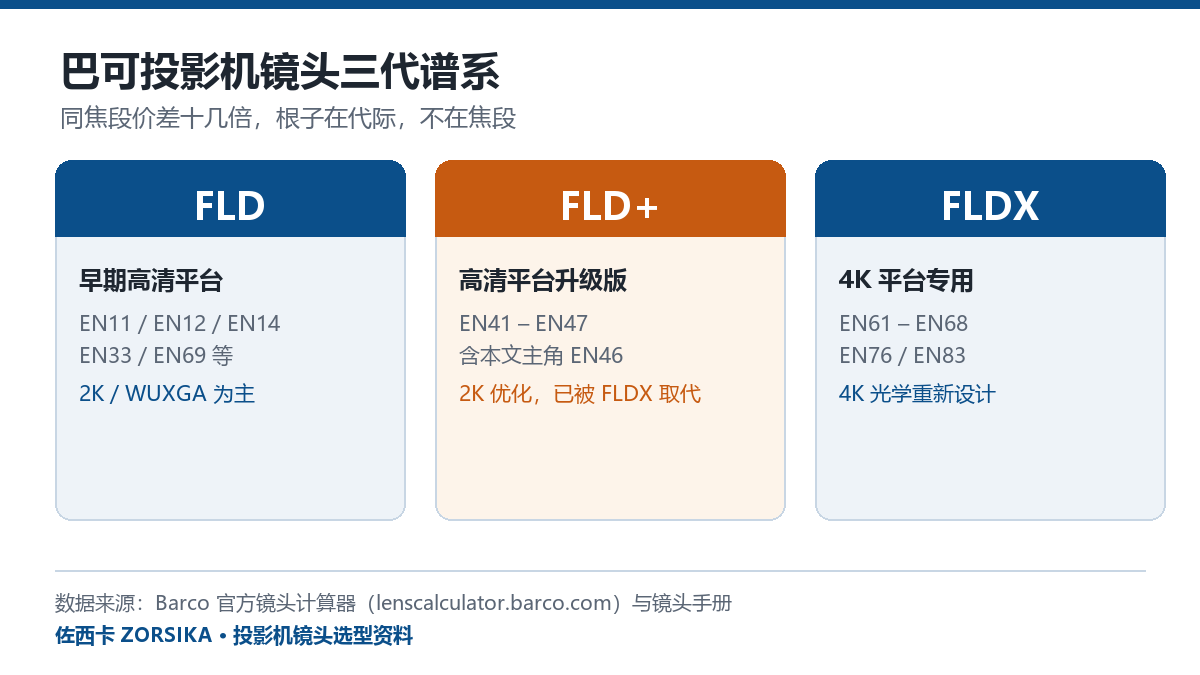
FLD / FLD+ / FLDX - the model prefix usually tells you the generation
The rule is simple: most EN4x are FLD+, EN6x are FLDX. But models such as EN33 and EN69 cannot be guessed from the prefix - you have to check the specific model's series. If a seller only says "a Barco 0.8 lens", that is not enough information to buy on.
2. EN46 vs EN66: same throw ratio, different generation
These two lenses share exactly the same native throw ratio: 0.75-1.13:1 on WUXGA platforms and 0.80-1.21:1 on WQXGA / 4K platforms. Judged on throw ratio alone they are equivalent. The real differences are these:
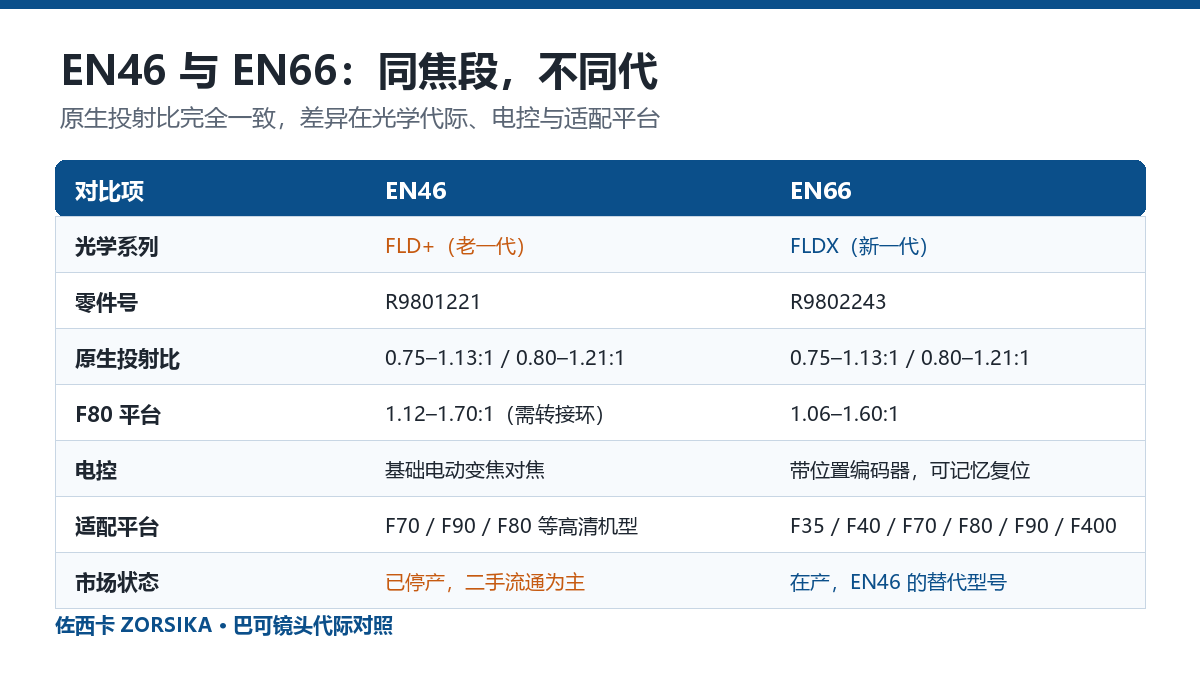
Same focal range, different generation: part numbers, motorised control and supported platforms are the dividing line
1. Optical series and part number. The EN46 belongs to FLD+ with part number R9801221; the EN66 belongs to FLDX with part number R9802243. The EN66 is the replacement for the EN46, which is discontinued and now circulates mainly on the second-hand market.
2. Motorised control. According to the manufacturer's documentation the EN66 has built-in position encoders, so zoom, focus and iris positions can be stored and recalled in one action - useful for multi-projector setups and automation systems. The EN46 offers basic motorised zoom and focus without position memory. On a single-projector demo you will not notice; in multi-projector, stage and cinema work it is a hard requirement.
3. Supported platforms. The EN46 mainly targets 1080p models such as the F70 and F90, and needs an adapter ring on the F80; the EN66 covers a wider range including F35, F40, F70, F80, F90 and F400. New 4K models only accept the EN6x series, so an older EN46 will not fit.
4. Weight. The EN46 weighs about 3.14 kg (Barco lens manual figure). For rigging work, factor that into the mount's load rating.
3. Throw ratio is not a constant - it changes with panel size
This is where lens selection most often goes wrong: the same lens has a different throw ratio on projectors with different panel sizes.
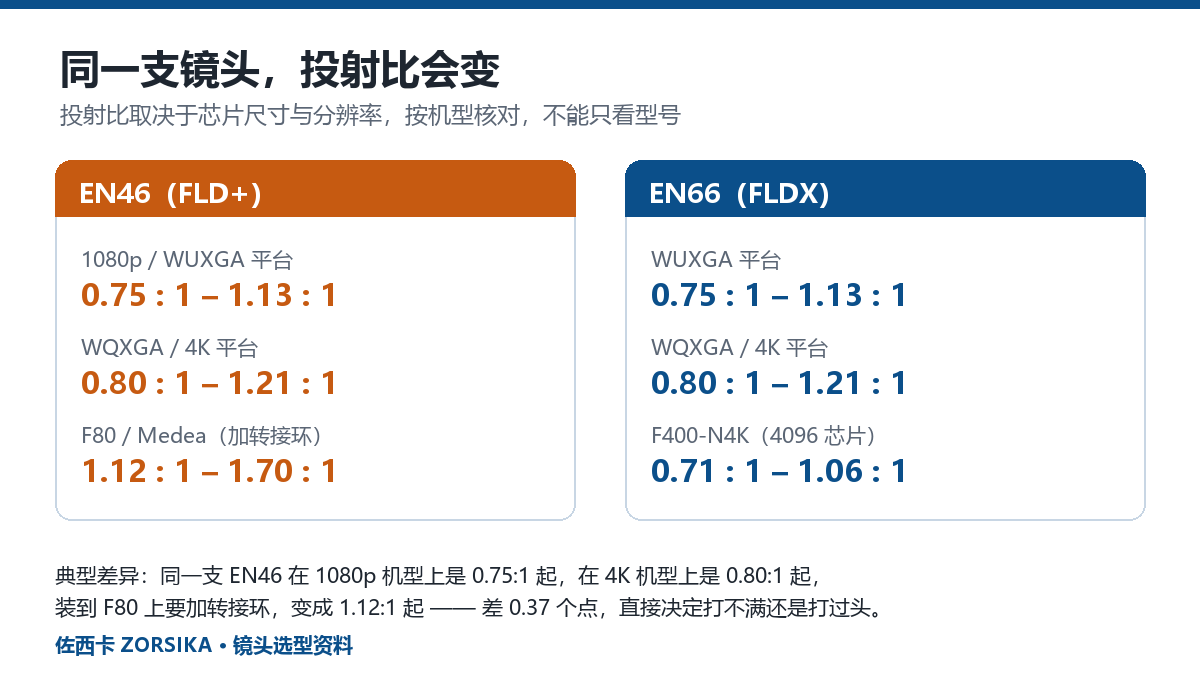
One EN46, three platforms, three throw ratios
Take the EN46: on 1080p / WUXGA it is 0.75-1.13:1; on WQXGA / 4K it is 0.80-1.21:1; fitted to an F80 / Medea with an adapter ring it becomes 1.12-1.70:1. The EN66 on an F400-N4K (4096 panel) is 0.71-1.06:1.
The gap between 0.75 and 1.12 is 0.37 - on a 100-inch screen that is tens of centimetres of throw distance, which decides whether the image underfills or overshoots. Always quote a throw ratio together with the projector model; a bare number means nothing.
4. How to choose for 4K
1080p models: the EN46 is perfectly adequate and cheaper - there is no reason to pay for 4K optics.
4K models: prefer the EN66. FLD+ glass was designed for 2K panels; on a 4K projector the corners tend to soften and show colour fringing. That is not sample variation, it is the optical design limit. We have seen EN46 units paired with 4K projectors where the centre stayed sharp while the corners clearly fell off.
If budget is tight and you must use a 4K projector, you can reduce the image size and avoid filling the full frame, keeping the effective image area inside the lens's best zone - but that is a compromise, not an equivalent substitute.
5. Four things to do when purchasing and inspecting
1. Check the part number, not the appearance. R9801221 is the EN46, R9802243 is the EN66. The lenses look very similar; you cannot tell them apart from the housing alone.
2. Tell original units from pulled units. For a pulled lens, inspect each item: scratches and fungus on the glass, haze on the coating, whether motorised zoom and focus travel fully, and any abnormal noise. Any one failure shows up directly in the image.
3. Confirm the flange and adapter ring. F80 / Medea platforms require an adapter ring; the wrong flange model either will not mount or shifts the optical axis.
4. Match the throw ratio to the target projector, not to the model name. Give the supplier the projector model, screen size and throw distance and let them work out which lens you need - do not guess from the model number yourself.
6. What ZORSIKA can provide
ZORSIKA supplies Barco EN-series projector lenses on a long-term basis, including original units and well-graded pulled units, together with matching flanges and adapter rings (such as Appotronics S PRO flanges and Zhongqiang HS flanges), and can work back from your projector model to the throw ratio and compatibility.
Send us the projector model, screen size and throw distance and we will tell you exactly which lens to use, whether an adapter ring is needed, and whether we can ship from stock. We do not offer a "universal replacement" line - lenses depend heavily on the projector and panel, and calling one universal just leaves the customer with a hidden problem.
Data sources: Barco official lens calculator (lenscalculator.barco.com) and Barco lens manuals; launch dates referenced from ProjectorCentral. Throw ratios and compatibility in this article follow official documentation; for physical units, refer to the supplied manual and your own measurements.