
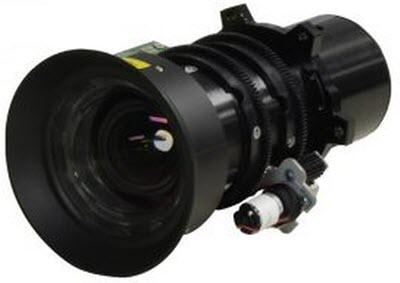
Eiki OEM Lens AH-A22020 Zoom is a factory-supplied optical accessory for Eiki engineering projectors, featuring a standard throw (Standard Throw) and a throw ratio of 0.95-1.22:1. The factory compatibility list covers 17 models. Before installation, verify the projector model and panel size; there is no need to make do with adapter rings. The value of an OEM lens lies not in the extra numbers in its specifications, but in the fact that it is calibrated at the factory for the optical path and mount of the relevant projector series. Once installed, image-circle coverage, edge illumination, and focus travel all meet their design values, so keystone correction is unnecessary to compensate for image quality.
I. Lens Specifications
| Brand | Eiki (Eiki) |
| Lens Model | AH-A22020 Zoom |
| Throw Ratio | 0.95-1.22:1 |
| Product Type | Standard throw lens (Standard Throw) |
| Compatible Models | 17 models |
| Warranty | 12 months; after-sales service is available for damage not caused by the user, based on the date on the shipping document |
The above specifications are subject to the manufacturer's official specifications. For mechanical dimensions, flange distance, and mount type not listed in the specifications table, contact us with the projector model. Ordering based solely on a similar model carries a risk that the lens will not fit.
II. Calculating Installation Distance from Throw Ratio
The throw ratio is the ratio of the installation distance to the image width. This OEM lens is a zoom lens (0.95-1.22:1), so a given image size corresponds to a range of distances. It can focus at any distance within that range during installation.
| Image Size | Image Width | Required Installation Distance |
|---|---|---|
| 100 inches | 2.15 m | Approx. 2.04 – 2.62 m |
| 120 inches | 2.58 m | Approx. 2.45 – 3.15 m |
| 150 inches | 3.22 m | Approx. 3.06 – 3.93 m |
| 200 inches | 4.30 m | Approx. 4.08 – 5.25 m |
The distances above are clear distances from the front of the lens to the screen and do not include clearance behind the projector for cooling and cable connections. These figures are based on a 16:10 image; actual installation should be verified on site and according to the manufacturer's manual.
Image quality differs at the two ends of the zoom range: toward the close end, the image is brighter and the edges are slightly softer; toward the far end, the edges are sharper and brightness drops slightly. If the venue allows, it is recommended to use the middle of the range. After installation, set the focus ring to the position that produces the sharpest image, then fine-tune the lens shift.
III. Compatible Models (17 Models)
The table below is taken from the OEM compatibility list. Brightness and resolution are populated from the model database; unavailable values are marked “—” and have not been estimated.
| Model | Brightness | Resolution |
|---|---|---|
| EIKI EK-610U | — | — |
| EIKI EK-610UA | — | — |
| EIKI EK-611W | — | — |
| EIKI EK-611WA | — | — |
| EIKI EK-612X | — | — |
| EIKI EK-612XA | — | — |
| EIKI EK-620U | — | — |
| EIKI EK-621W | — | — |
| EIKI EK-623U | — | — |
| EIKI EK-623UW | — | — |
| EIKI EK-625U | — | — |
| EIKI EK-810U | — | — |
| EIKI EK-811W | — | — |
| EIKI EK-812U | — | — |
| EIKI EK-815U | — | — |
| EIKI EK-818U | — | — |
| EIKI EK-820U | — | — |
For models not listed, send us photos of the projector nameplate and the existing lens so we can verify compatibility. Platforms of the same generation often share the same mount, but ordering based on a similar model carries unnecessary risk.
Throw Ratios by Model Series
The nominal throw ratio of the same AH-A22020 Zoom varies across the series below. Use the value for the series of the projector in question when selecting a lens.
| Model Series | Throw Ratio |
|---|---|
| — | 0.95-1.22:1 |
IV. Three Checks Before Replacement
- Confirm the projector chip and resolution. OEM lenses are designed for a specific panel size. If the panel specification differs, the image circle cannot cover the full image, resulting in vignetting or edge light loss.
- Calculate the installation distance first. This lens has a nominal throw ratio of 0.95-1.22:1. Use the table in Section II to match the lens to your venue dimensions. Fixed-focus lenses offer no adjustment margin, and even with a zoom lens, allow 10–20 cm of clearance at both ends of the range.
- Verify the mount and locking mechanism. OEM lenses are calibrated to the mount of the corresponding projector series. After installation, you must hear the lens click into the locked position. A skewed image or soft edges usually indicate that the lens is not fully locked, rather than a problem with the lens itself.
If you are unsure, send us one photo each of the projector nameplate and the existing lens nameplate. Verification against the actual hardware is the most reliable approach.
Request a Consultation
To obtain OEM lens selection solutions, project configuration recommendations, or the complete compatibility list for the Zorsika AH-A22020 Zoom, contact us through the following channels:
| Phone | 0086-20-38551187 |
| sales@zorsika.com | |
| Working hours: Monday to Friday 9:00-18:00 | |
The lens model, OEM part number, and compatible models in this article are sourced from the OEM compatibility list and the Zorsika product database. The data is updated continuously; final details are subject to confirmation at the time of quotation.